
The Challenge
Background
Engineers are developing drones for off-world planetary exploration. The flight pattern on these drones will be controlled autonomously. But what if something goes wrong during mid-flight and the autonomous controls do not work correctly? Multiple complications could arise. The drone could start to lose altitude, fly off course into dangerous terrain and weather, or have an uncontrolled landing while engineers are developing new solutions for autonomous controls to be repaired. In the meantime, a drone pilot could take over control of the drone for the safety and protection of multi-million- or multi-billion-dollar equipment and experiments that are aboard the drone.
However, there would not be a human on the planet to repair the drone, so imminent response manual control is vital to the mission(s). The transmissions delay between Earth and the exploratory planet will have a huge impact on the response, so intuitive controls will be ideal for the pilot and drone.
Future transmission technologies are becoming more accessible locally, globally and universally. The WiFi transmissions within a smartphone are becoming broader and are being developed for more distinctive uses in the near future.
This challenge encourages the programmer within you to design and implement new algorithms for the gyro sensor within a smartphone or tablet for drone piloting. The gyro sensor can be used in multiple ways for piloting a drone, but a basic layout has yet to be developed. The primary goal is to find a natural feel among the pilot, controller, and drone.
Potential Considerations
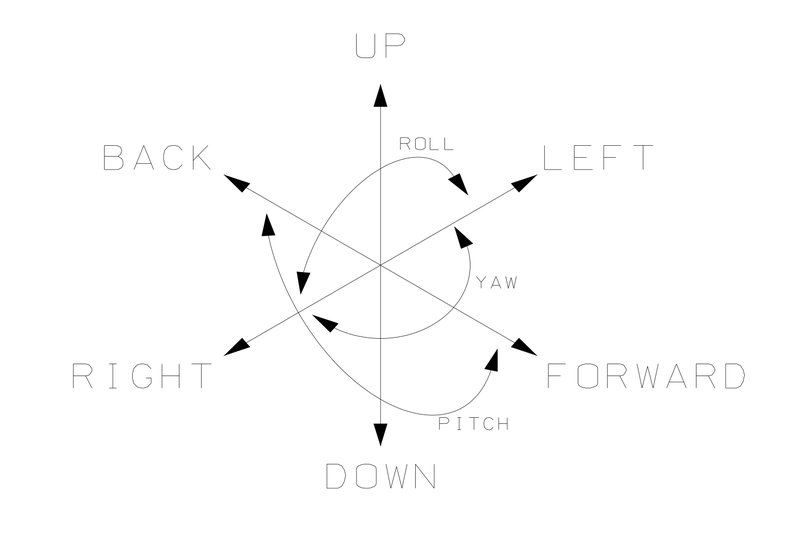
You may (but are not required to) consider the following when designing your system:
- Basic controls for piloting a drone.
- Throttle up: Ascend (raises the drone’s altitude above a surface)
- Throttle down: Descend (lowers the drone’s altitude above a surface)
- Yaw right: Rotate the drone clockwise
- Yaw left: Rotate the drone counter-clockwise
- Roll right: Tilt the drone to the right
- Roll left: Tilt the drone to the left
- Pitch up: Tilt the front of the drone up (reverse)
- Pitch down: Tilt the front of the drone down (forward)
- Example of controls A
- Throttle up: Raise the smartphone
- Throttle down: Lower the smartphone
- Yaw right: Rotate the smartphone clockwise
- Yaw left: Rotate the smartphone counterclockwise
- Roll right: Tilt the smartphone to the right
- Roll left: Tilt the smartphone to the left
- Pitch up: Tilt the top of the smartphone up (reverse)
- Pitch down: Tilt the top of the smartphone down (forward)
- Example of controls B
- Combination of Gyroscope and Voice
- Throttle up: Say “Throttle plus 50%”
- Throttle down: Say “Throttle minus 50%”
- Yaw right: Say “Right yaw plus 10%”
- Yaw left: Say “Left yaw plus 10%”
- Roll right: Tilt the smartphone to the right
- Roll left: Tilt the smartphone to the left
- Pitch up: Tilt the top of the smartphone up (reverse)
- Pitch down: Tilt the top of the smartphone down (forward)
- Combination of Gyroscope and Voice
- Example of controls C
- Combination of Gyroscope and Touch
- Throttle up: Slide thumb up on virtual joystick
- Throttle down: Slide thumb down on virtual joystick
- Yaw right: Rotate the smartphone clockwise
- Yaw left: Rotate the smartphone counterclockwise
- Roll right: Slide thumb right on virtual joystick
- Roll left: Slide thumb left on virtual joystick
- Pitch up: Tilt the top of the smartphone up (reverse)
- Pitch down: Tilt the top of the smartphone down (forward)
- Combination of Gyroscope and Touch
- Example of controls D
- Combination of Gyroscope, Touch, and Voice
- Throttle up: Slide thumb up on virtual joystick
- Throttle down: Slide thumb down on virtual joystick
- Yaw right: Rotate the smartphone clockwise
- Yaw left: Rotate the smartphone counterclockwise
- Roll right: Slide thumb right on virtual joystick
- Roll left: Slide thumb left on virtual joystick
- Pitch up: Tilt the top of the smartphone up (reverse)
- Pitch down: Tilt the top of the smartphone down (forward)
- Combination of Gyroscope, Touch, and Voice
- Reverse loop: Say “Drone loop backwards”
- Front loop: Say “Drone loop forward”
- Barrel roll: Say “Barrel”
You may also consider adding additional sensors to the app to determine other hazards of flight exploration. These include, but are not limited to: