
Project Details
The Challenge | Out of This World!
XVISION
In xvision team, we aimed to improve the mission of the quadcopter and how to control it easier. So, we made it to be controlled by hand and combined it with 360 camera and show the images of this camera on VR. We connected the camera with VR wirelessly.
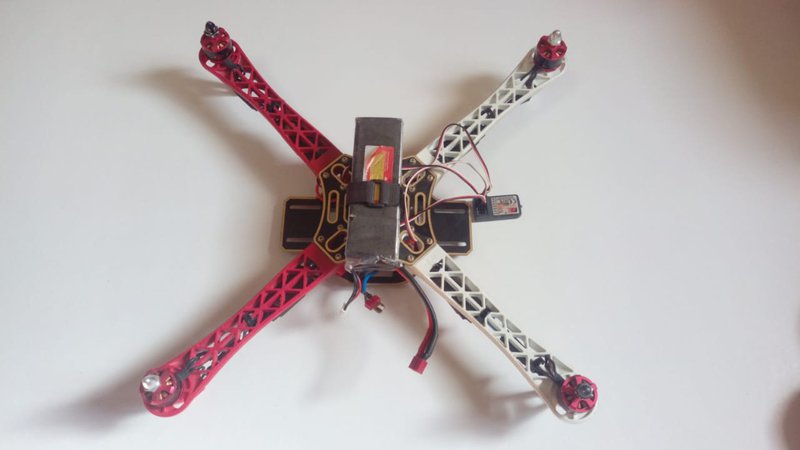
Imagine you are playing with your VR and once you are finished , we tell you congratulations ! you are done with your work . This is the idea in a nutshell , and this is really would be the life of the Quad Copter controller.
The Idea :
The idea is mainly based on applying modifications on the Quad Copter controlling system , and approaching a new way of dealing with it . We aim to develop a virtual environment using a real one . First let’s briefly explain the traditional way of controlling the Quad Copter as we are going to share some principals but in different context .
There are four main quadcopter controls:
- Roll
- Pitch
- Yaw
- Throttle
Roll moves your quadcopter left or right. It’s done by pushing the right stick on your transmitter to the left or to the right.
It’s called “roll” because it literally rolls the quadcopter.
For example, as you push the right stick to the right, the quadcopter will angle diagonally downwards to the right.
Here, the bottom of the propellers will be facing to the left. This pushes air to the left, forcing the quadcopter to fly to the right.
The same thing happens when you push the stick to the left, except now the propellers will be pushing air to the right, forcing the copter to fly to the left.
Pitch is done by pushing the right stick on your transmitter forwards or backwards. This will tilt the quadcopter, resulting in forwards or backwards movement.
Yaw was a little bit confusing for me in the beginning. Essentially, it rotates the quadcopter clockwise or counterclockwise.
This is done by pushing the left stick to the left or to the right.
Throttle gives the propellers on your quadcopter enough power to get airborne. When flying, you will have the throttle engaged constantly .
Actually , We have three main modifications on this control system :
- First of them : a movable camera is hanged in the Quad Copter and it moves according to the directions of the controller’s head .
- Second : the controller of the copter would watch the whole situation throughout a VR glass that will have its environment from the camera broadcast .
- Third : The control of the Copter movement itself is no more throughout a remote as explained above , it would be a hand control instead.
Let us discuss each point separately in details and after a while connecting them .
The Movable Camera
This Camera is free to move in any of the 8th quad of space . Actually , the user will wear a kind of headset has an accelerometer that send signals to the camera with the specific coordinates in the 3D space wirelessly . For example , the user will turn his head right with an angle 30 degree , the axis of the camera will turn simultaneously to the same direction .
Therefore, the user is the one who will determine which part of the environment to be broadcasted by the camera cause this broadcast will be used later in the VR glass Modification step .
VR Glass
We will use the live broadcast of the camera to be the VR Environment . Hence , when the user wear the VR glass he has a full vision of the situation , even he can see him self in this environment if he wish . Furthermore , we will combine between the headset used in the previous step and the glass so that the movement of the user’s head will cause change in the directions of the camera and consequently change in the broadcast and the environment shown in the VR glass . -
Hand controlling system
The quadcopter will be piloted using the hand controller and it will live-stream video back to the VR headset. In order to accomplish those tasks, the quadcopter should meet the following requirements. First, the hand controlled quadcopter should be able to fly just like a traditional quadcopter and support basic quadcopter movements (as mentioned above): roll, pitch, yaw, and throttle. In addition, the quadcopter should also be able to conduct special movements such as emergency stop and take off. With the special commands, the hand controlled quadcopter system can be more intuitive and safer to fly.
The hand controller is broken up into three general tasks, one is reading the hand’s input this includes the position and motion, and specialized commands. The second task is converting that into a string that the communication base can read. The final task is to take the string with the data, whether that be a specialized command or a motion reading, and send it to the communication base via radio communication.
-MATERIALS:
1- VR Headset
2-LiPo battery 5500mAh
3- Brushless motors
4-ESC
5-Frame
6- 3DR radio telemetry
7-FPV Video Transmitter and Receiver
8- Propellers
9- Accelerometer
10-Throttle resistive strip
11-Arduino Uno
12- Breadboard
13- Yaw resistive strip
14- Flex Sensor
-RESOURCES:
https://www.nasa.gov/aeroresearch/programs/aosp/utm
https://data.nasa.gov/stories/s/gk8h-th3y
https://software.nasa.gov/software/KSC-12952
https://software.nasa.gov/software/LAR-19281-1
https://imagine.gsfc.nasa.gov/science/data/sat_to_grnd.html
https://gist.github.com/a619b794fb538f045562fceec1d50636.git
https://gist.github.com/b1cb5392d0dc58ddc0980f0b58f313df.git